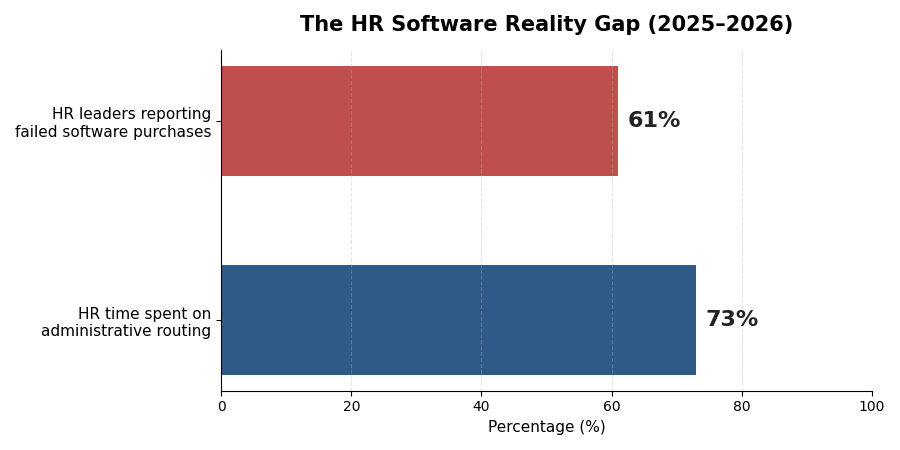
Human resources teams spend roughly 73% of their working hours on administrative routing, repetitive policy questions, and manual scheduling that modern software handles automatically. Yet according to Gartner's HR technology benchmarks, 61% of HR leaders report purchasing software over the past two years that failed to deliver its promised time savings.
The disconnect comes down to how HR software is sold and reviewed. Most guides are written by vendor marketing teams or affiliate aggregators who regurgitate feature checklists without examining how a tool behaves inside an actual 40-person or 250-person company. They ignore implementation fees, skip over per-employee contract escalations, and omit the change management required to get managers and staff to trust the system.
This guide maps HR software directly to six core operational bottlenecks: candidate screening, interview coordination, onboarding, policy support, performance reviews, and retention analytics. For each category, you will find verified 2026 pricing structures, honest trade-offs that sales reps avoid mentioning on discovery calls, compliance requirements under US and European regulations, and a practical framework to calculate payback periods before signing an annual contract.
TL;DR: Best AI HR Tools by Use Case (2026 Quick Reference)
HR Use Case | Recommended Tool | Best Fit For | Verified 2026 Pricing | Primary Trade-Off |
Resume Screening & ATS | 30–500 employee growth companies | Ashby from $360–$400/mo (Pin); Greenhouse from $5,100–$12,250+/yr (Pin) | Per-employee scaling and annual renewal uplifts of 8–15% | |
Interview Scheduling | High-volume or complex panel hiring | Calendly ~$16/user/mo; GoodTime custom (~$15,000+/yr by candidate volume) | Enterprise schedulers are overkill if hiring under 50 roles/year | |
Onboarding Automation | Remote & distributed SMBs | Rippling from $8/user/mo base ($23–$38/user stacked) (Pin); Deel from $19–$29/user/mo | Automating tasks without human check-ins increases 90-day churn | |
HR Helpdesk & Policy Q&A | Leena AI / Moveworks | 100+ employee organizations | DIY Knowledge Base ~$16/mo; Leena AI & Moveworks custom per-seat quotes (Peoplebox) | Requires clean, up-to-date internal policy docs to prevent hallucinations |
Performance Reviews | Organizations with dedicated team managers | 15Five from $4–$16/user/mo (Rework); Lattice from $8–$13/user/mo ($4k annual min) (FeedbackPulse) | Unannounced AI evaluation tools trigger immediate employee distrust | |
Retention & Sentiment | 100–1,000+ employee teams | Peoplebox from $8/user/mo; Full suites $15–$17/employee/mo (ThriveSparrow) | Highlights where morale is dropping, never why—managers must still intervene |
1. What "AI in HR" Actually Means in 2026
When software vendors pitch artificial intelligence to human resources departments in 2026, they are selling one of two distinct technical architectures. Understanding the difference between them protects your budget from redundant software overlap.
Embedded HRIS AI vs. Specialist Point Solutions
Embedded HRIS AI: Core platforms like Rippling, BambooHR, Workday, and HiBob integrate language models and predictive scoring directly into their existing databases. Because your HRIS already holds payroll records, PTO balances, org charts, and review history, embedded AI drafts job descriptions, summarizes review cycles, and flags payroll anomalies without third-party data syncs.
AI-Native Point Solutions: Standalone tools like Paradox (conversational screening), GoodTime (panel interview orchestration), and SeekOut (outbound technical sourcing) solve a single high-friction bottleneck with deep workflow automation.
Architectural Factor | Embedded HRIS AI (e.g., Rippling, Lattice) | Specialist Point Solution (e.g., GoodTime, SeekOut) |
Data Integration | Native access to employee records and payroll | Requires two-way API syncs and webhook maintenance |
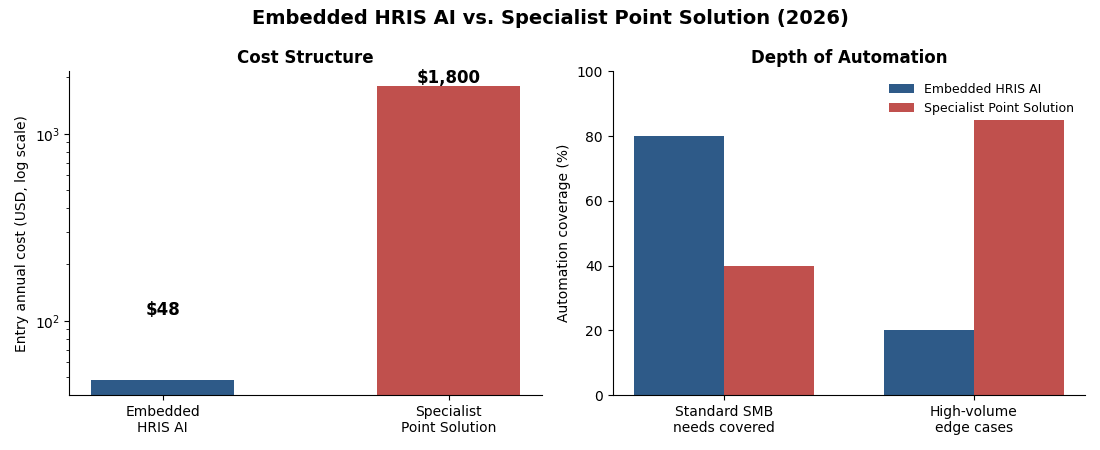
Cost Structure | Included in base tier or $4–$8/seat/month add-on | Standalone contract ($1,800 to $35,000+ per year) |
Depth of Automation | Covers 80% of standard SMB operational needs | Built for high-volume edge cases (100+ hires/year) |
Ideal Buyer Profile | Companies with 15 to 250 employees | Mid-market and enterprise teams with dedicated Ops staff |
For most small and mid-sized businesses (SMBs) under 150 employees, buying three bolt-on tools costs more in licensing and integration maintenance than upgrading to a modern HRIS with built-in automation. To see how growing companies connect departmental tools without bloating software spend, read our AI Agentic Workflows for SMEs 2026 Report.
The Legal Reality: EU AI Act and US EEOC Compliance
Under Annex III of the European Union's Artificial Intelligence Act, any AI system used for recruitment, candidate filtering, task allocation, performance evaluation, or promotion decisions is legally classified as High-Risk. Operating high-risk HR AI in Europe or evaluating EU-based remote applicants requires three non-negotiable guardrails:
Mandatory Human Oversight: Automated screening tools cannot unilaterally reject candidates or terminate workers without documented human review.
Technical Documentation & Logs: Employers must maintain audit trails showing how scoring models weight candidate attributes.
Candidate Notification: You must explicitly inform applicants and employees when automated systems evaluate their resumes, video responses, or workplace performance.
In the United States, the Equal Employment Opportunity Commission (EEOC) enforces Title VII of the Civil Rights Act and the Americans with Disabilities Act (ADA) against algorithmic hiring bias, alongside municipal statutes like New York City's Local Law 144. Under EEOC guidance, the employer is legally liable for algorithmic discrimination even if a third-party vendor built and trained the model. If an automated screener disproportionately filters out candidates based on age gaps, disability accommodations, or zip codes, the legal liability lands on your company, not your SaaS vendor.
2. AI for Recruiting & Resume Screening
Sourcing candidates and filtering inbound applications is where automation saves the most recruiter hours—and where poorly configured software creates the highest legal exposure. Companies deploying automated screening report 40% faster time-to-hire (LinkedIn Talent Solutions, 2025), yet Harvard Law research found that 23% of organizations deploying unaudited screening algorithms faced EEOC complaints within 18 months.
Tools That Actually Work
Ashby: The strongest AI-native ATS for SMBs and tech companies under 200 employees. Ashby combines ATS tracking, outbound sequences, scheduling, and pipeline analytics in one interface. Its Foundations tier starts at $400/month billed monthly ($360/month billed annually, or $4,320/year) for teams under 50 employees (Pin). Watch for Ashby's 2025–2026 pricing updates: elevated hiring manager seats run ~$800/year (PitchNHire) and heavy AI features draw from a separate credit pool (Truffle).
Greenhouse: Built for structured mid-market hiring (100 to 1,000+ employees) with scorecard interviewing and anonymization rules. Pricing scales by headcount: small teams pay $5,100 to $6,500/year, median mid-market contracts sit at $12,250/year, and enterprise Pro tiers reach $36,000 to $70,000+/year, plus $1,000 to $15,000 in implementation fees (Pin, LeonStaff).
HireVue: Enterprise video interviewing and assessment software starting around $35,000/year (Peoplebox). Effective for high-volume retail or hospitality hiring, but requires strict adverse-impact auditing before EU or US use.
SeekOut: Outbound technical and healthcare sourcing starting at $149/month billed annually for Recruit Core (Willo), with custom team pricing for deep ATS syncs.
What the Vendor Won't Tell You
Resume-ranking models trained on historical hires encode past bias. If your team historically hired from specific universities or penalized resumes with caregiving gaps, the algorithm downgrades qualified applicants outside that pattern. Always ask vendors: "What adverse impact testing have you done, and can I see the results?" Configure your ATS to score strictly against objective job-skill rubrics rather than past employee profiles. For a wider look at how AI bias shows up in real deployments, see The Hidden Winners and Losers of AI in 2026.
3. AI for Interview Scheduling & Coordination
Scheduling back-and-forth wastes an average of 5.4 hours per hire for recruiters (Gem, 2025). Matching calendars across multiple panelists and time zones delays offers by days and loses top candidates.
Tools That Actually Work
GoodTime: Best-in-class for complex panel interviews. Syncs with Google Calendar, Outlook, and Greenhouse, load-balancing interviews across trained panelists and suggesting backup interviewers automatically. Priced by annual candidate volume (GoodTime Pricing), starting around $15,000/year.
Paradox (Olivia): Conversational AI that screens and schedules candidates via SMS and WhatsApp in under three minutes. Custom-priced for high-volume hourly hiring in retail, healthcare, and logistics (Peoplebox).
Calendly: Automated routing forms and round-robin scheduling for $16/seat/month on its Teams plan.
The SMB Reality Check
If you hire fewer than 50 people per year, Calendly at $16/month combined with native self-scheduling links inside Ashby solves 80% of this bottleneck. GoodTime's $15,000/year contract only pays back at high interview volume.
4. AI for Onboarding Automation
Roughly 20% of employee turnover happens in the first 45 days—almost always due to disorganized onboarding (BambooHR, 2024).
Tools That Actually Work
Rippling: Best for SMBs with remote teams. Rippling provisions laptops, configures app permissions, enrolls staff in benefits, and flags when new hires fall behind on checklists. While the base platform starts at $8/user/month, stacking payroll, benefits, and IT device management brings real-world rates to $23 to $38 per employee per month (Pin, ERP Research).
Deel: Best for international onboarding across 150+ countries, with AI that catches cross-border payroll anomalies before pay runs close. Costs $29/contractor/month and $19/employee/month for global HR/EOR modules (Peoplebox).
Leena AI: Conversational onboarding assistant on Slack and Teams that answers policy questions 24/7 and cuts onboarding ticket volume by 60–70%.
What No One Else Covers: Change Management for the New Hire
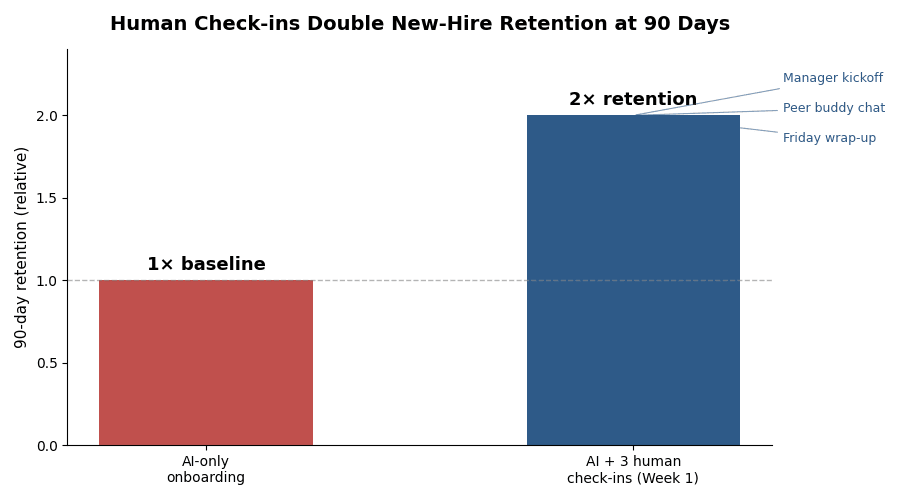
AI onboarding tools are only as effective as the human touchpoints scheduled alongside them. Gallup (2025) research shows that companies pairing automated onboarding with at least three human check-ins during Week 1 (manager kickoff, peer buddy coffee chat, and Friday wrap-up) see 2× higher retention at 90 days compared to AI-only workflows.
Onboarding Day | Automated by Software (Rippling / Deel) | Reserved Strictly for Human Connection |
Pre-Boarding | Contract signature, tax forms, laptop shipping, SSO setup | Personal welcome note from manager & team intro |
Day 1 | Benefits portal tour, security training, handbook Q&A bot | 45-minute live kickoff with manager on 30-day expectations |
Day 3 | Automated check on software access and permissions | Unstructured coffee chat with assigned peer onboarding buddy |
Day 5 | Pulse survey collecting initial onboarding friction | Friday wrap-up call with manager to answer real workflow questions |
For a practical rollout blueprint, see our AI Adoption Roadmap for Small Business 2026.
5. AI for HR Helpdesk & Policy Q&A
HR teams spend 40% of their time answering the same 20 questions about benefits, leave, and expense policies (ServiceNow, 2025).
Tools That Actually Work
Moveworks (ServiceNow): Enterprise service desk agent resolving 70%+ of HR and IT queries automatically across Slack, Teams, and Workday (Leena AI). Custom six-figure pricing for 1,000+ employee enterprises.
Leena AI: Mid-market equivalent (100 to 1,000 employees) integrating across Slack, Teams, and WhatsApp on custom per-employee quotes (Peoplebox).
Notion AI / Guru: For teams under 100 employees, build a clean handbook knowledge base in Notion or Guru and let its native Q&A bot (~$10–$16/user/month) answer policy questions in
#ask-hr.
Solution Tier | Target Company Size | Realistic Annual Cost (100 Staff) | Setup Time | Key Limitation |
Notion Q&A / Guru | 10–100 employees | $1,200 – $2,400 / year | 1–2 days | Answers static policy docs; cannot check personal PTO balances |
Leena AI | 100–1,000 employees | ~$6,000 – $18,000 / year (Quote) | 3–6 weeks | Requires clean API integration with your underlying HRIS |
Moveworks | 1,000+ employees | $50,000 – $150,000+ / year | 2–4 months | Increasingly tied to the ServiceNow ecosystem (Leena AI) |
The Garbage-In, Garbage-Out Trap: An HR policy bot is only as accurate as your underlying documentation. If your Notion wiki still contains an outdated 2023 remote work policy alongside your 2026 handbook, the assistant will quote the wrong rules to your staff. Audit and archive stale policy documents before turning on automated Q&A.
6. AI for Performance Management
Annual reviews are universally disliked by managers and employees. AI makes feedback continuous by synthesizing weekly check-ins, peer praise, and goal progress into review drafts—but if poorly communicated, it looks like continuous workplace surveillance.
Tools That Actually Work
Lattice: Sets goals, tracks progress, and generates review drafts while flagging biased manager phrasing. Starts at $8/seat/month (OKRs) or $11–$13/seat/month (Foundations), billed annually with a $4,000 minimum contract (FeedbackPulse, People Managing People).
15Five: Lighter, employee-driven weekly check-ins with AI manager coaching. Starts at $4/user/month (Engage), $11/user/month (Perform), and $16/user/month (Total Platform) with no steep annual minimum (Rework, Engagedly).
Betterworks: OKR-focused suite that turns meeting transcripts into goal insights (Betterworks) on custom mid-market quotes.
Protecting Employee Trust
Companies that introduce AI into performance reviews without an explicit communication plan experience 34% higher attrition in Year 1 (Deloitte, 2025). Before enabling AI review summaries, publish a clear charter stating three rules:
Role Boundary: AI is used solely as a summarization assistant for managers—never as an autonomous judge scoring staff or setting pay.
Data Transparency: List the exact inputs read (submitted check-ins, peer praise, and OKRs) and confirm private Slack DMs, emails, and webcams are never monitored.
Right to Challenge: Guarantee employees can review and amend any summary during their live 1-on-1 review.
7. AI for Retention & Sentiment Analysis
Replacing an employee costs 1.5× to 2× their annual salary. Most resignations are predictable three to six months in advance if you monitor engagement trends and manager friction.
Tools That Actually Work
Culture Amp: Industry-leading engagement surveys with AI insights that identify flight risk by team and manager, complete with an AI Coach and GDPR/SOC2 compliance (Culture Amp). Full performance and engagement bundles average $15–$17/employee/month (ThriveSparrow).
Glint (Microsoft Viva): Best for organizations standardized on Microsoft 365, surfacing themes from open-text employee feedback.
Peoplebox.ai: SMB-friendly platform connecting OKRs to engagement pulse data starting at $8/user/month (Peoplebox).
The Honest Limitation: Sentiment AI tells you that people are unhappy, not why in a way software can fix alone. You still need empathetic managers who can hold hard conversations—see Human Skills AI Cannot Replace in 2026 for why emotional intelligence matters more as your HR stack automates.
8. ROI Framework: How to Calculate If Any of This Is Worth It
Use this 3-step formula before signing any annual contract:
Time Audit: Track how many hours/week your team spends on the exact task the tool replaces.
Cost of That Time: Multiply weekly hours × 4 × hourly HR/manager labor cost.
Payback Period: Divide the tool's all-in monthly cost (including amortized Year-1 implementation fees) by your monthly dollar savings.
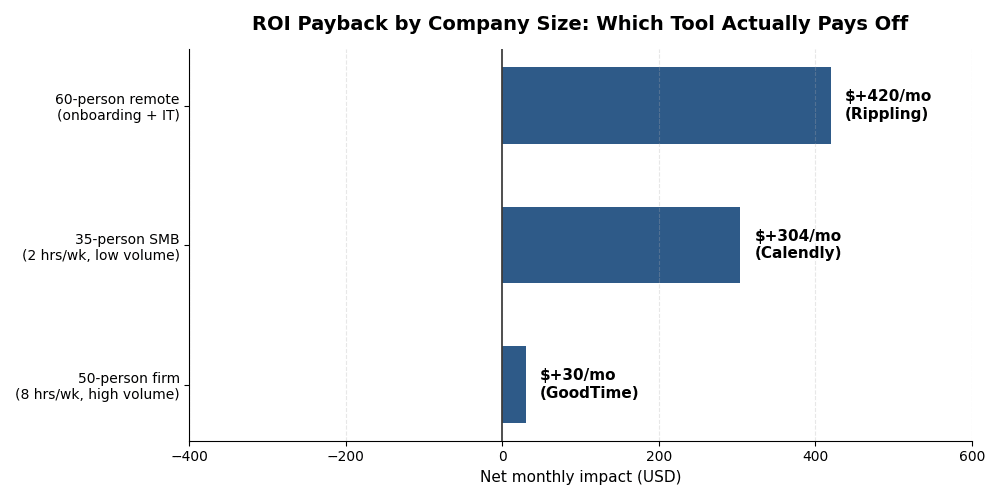
Scenario | Manual Labor Cost | Tool & True Monthly Cost | Net Monthly Impact | Verdict |
50-Person High-Growth Firm (Scheduling 8 hrs/wk @ $40/hr) | $1,280/mo (32 hrs/mo) | GoodTime (~$1,250/mo) | Breakeven in Month 1 + faster candidate close rate | Buy if panel volume is high |
35-Person SMB (Scheduling 2 hrs/wk @ $40/hr) | $320/mo (8 hrs/mo) | -$930/mo loss on GoodTime; +$304/mo net savings on Calendly | Use Calendly ($16/mo) | |
60-Person Remote Company (Onboarding & IT 10 hrs/wk @ $45/hr) | $1,800/mo (40 hrs/mo) | Rippling Core + IT (~$1,380/mo) | +$420/mo net labor savings + zero day-one laptop delays | Buy Rippling |
Plug your own team's headcount, hourly rates, and vendor quotes into our interactive AI ROI Calculator 2026 to calculate your exact payback period in under two minutes.
9. What to Do Before You Buy: 5 Questions for Every Vendor
Ask every vendor these five questions in writing before signing an order form:
"What adverse impact testing have you done on your screening/scoring AI, and can I see the results?"
If a recruiting vendor cannot share independent bias audit documentation, your company assumes direct EEOC and EU AI Act liability for disparate impact.
"What employee data do you store, where is it hosted, for how long, and is it excluded from training your foundation models?"
Confirm SOC2 and GDPR boundaries and ensure proprietary employee performance notes and compensation data never enter public training corpora.
"What is the implementation timeline and fee, and who owns data migration—us or you?"
Enterprise ATS and HRIS vendors routinely charge $1,000 to $15,000 for setup and data migration, which can double a small team's Year-1 software outlay (Pin).
"What does customer success look like after Month 3 when we stop being a new logo, and do AI features draw from metered credits?"
Uncover hidden AI credit pools (Truffle), per-employee headcount true-ups, and standard 8–15% annual renewal escalations upfront.
"Can we bulk-export all candidate scorecards, performance reviews, and audit logs in standard CSV/PDF format if we cancel?"
Some vendors lock historical review notes inside proprietary formats to inflate switching costs. Require bulk data export clauses in your contract.
Frequently Asked Questions (FAQ)
What is the best AI tool for HR in 2026?
No single platform wins every category. For SMBs under 200 employees, Rippling is the strongest core platform for onboarding, payroll, and IT automation, Ashby leads for recruiting and pipeline analytics, and 15Five or Lattice lead for continuous performance management.
Can small businesses afford AI HR tools?
Yes, if you skip enterprise contracts with steep annual minimums. A 35-person team can pair Calendly ($16/seat/month for scheduling), 15Five ($4–$11/user/month for performance and check-ins), and a Notion AI handbook (~$10–$16/user/month for policy Q&A) for under $500/month total. For a full budget breakdown, read How Much Does AI Cost for Small Business in 2026?
Is AI in hiring legal in Europe and the US?
Yes, under strict legal guardrails. The EU AI Act classifies hiring and performance evaluation AI as high-risk, mandating human oversight, technical documentation, and bias testing. In the US, the EEOC holds employers directly liable for algorithmic bias under Title VII and the ADA, and laws like NYC Local Law 144 require annual independent bias audits.
How do I introduce AI HR tools without upsetting my team?
Frame AI strictly as an administrative assistant that removes paperwork rather than a surveillance system. Disclose exactly what data is used, guarantee private chats and emails are untouched, give employees the right to challenge AI-drafted summaries, and pair tools with live human check-ins.
What HR tasks can AI fully automate vs. what still needs humans?
AI reliably automates interview scheduling, first-line policy Q&A, device provisioning, payroll anomaly checks, and review note summarization. Humans must own final hiring calls, compensation decisions, performance delivery, conflict resolution, and terminations.
How long does it take to see ROI from AI HR tools?
Self-serve tools (Calendly, 15Five, Notion Q&A) pay back in 30 to 60 days; full ATS or HRIS migrations (Greenhouse, Rippling, Lattice) take 4 to 8 weeks to implement and reach full financial payback in 4 to 8 months.
Conclusion: Buy by Bottleneck, Not by Feature List
Buy HR software by use case, never by feature checklist. For most SMBs, the optimal stack is two tools maximum: one unified HRIS (Rippling or Deel) for onboarding and operations, and one specialist talent platform (Ashby for recruiting or 15Five / Lattice for performance and retention).
See how agentic AI connects across operations: Read our AI Agentic Workflows for SMEs 2026 Report.
Roll out new tools without team pushback: Follow our AI Adoption Roadmap for Small Business 2026.