TL;DR
If you're wondering how to stay relevant in an AI-driven economy, the answer isn't learning hundreds of prompts or becoming a machine learning engineer.
The professionals who thrive in 2026 and beyond will understand how to collaborate with AI, orchestrate workflows, verify outputs, and integrate intelligent systems into everyday operations.
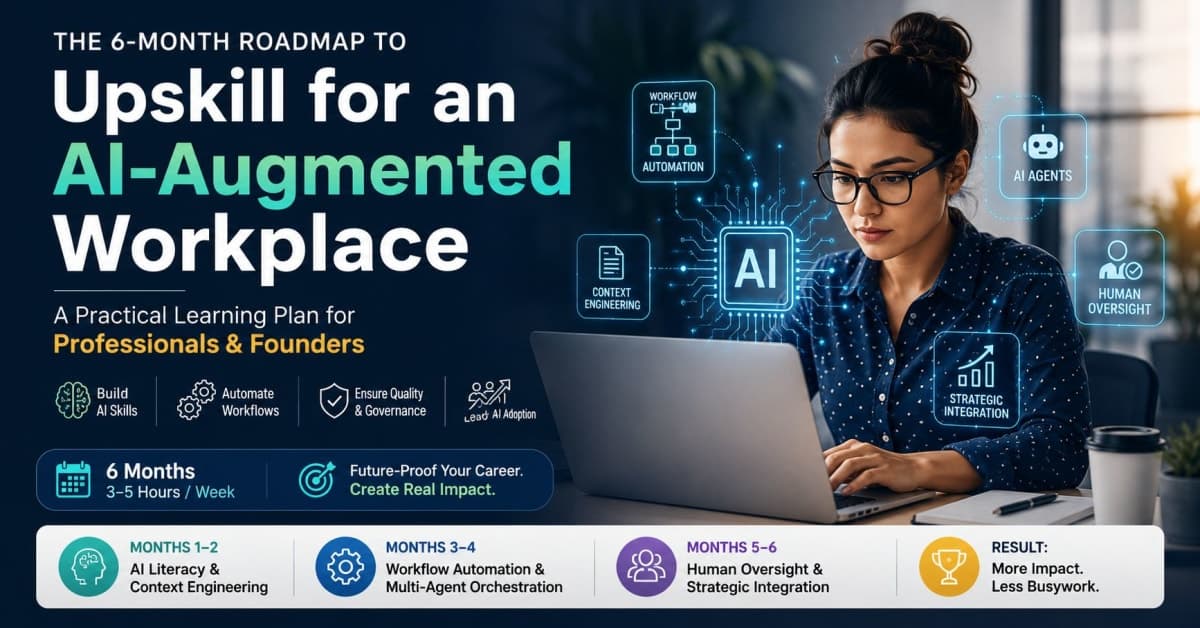
This six-month roadmap is designed for busy professionals, entrepreneurs, and small business owners who can dedicate just 3–5 hours per week to learning.
Skills You'll Develop
Context engineering and AI collaboration
Multi-modal AI workflows
No-code automation and orchestration
AI agent management and guardrails
Human-in-the-loop quality control
Strategic AI implementation
Cost-aware system design
Risk awareness and quality assurance
Recommended Platforms
DeepLearning.AI Short Courses
OpenAI Learning Resources
Anthropic Documentation
Zapier University
Make Academy
Coursera AI Programs
n8n Community
Time Commitment
3–5 hours per week for 6 months
Outcome
By the end of this roadmap, you'll be capable of identifying automation opportunities, building AI-assisted workflows, and leading AI adoption initiatives within your organization or business.
The Skill Arbitrage of 2026
A few years ago, learning a new software platform was often enough to gain a competitive advantage.
Today, that advantage disappears quickly.

AI tools are becoming accessible to nearly everyone. The ability to generate text, create images, summarize documents, or draft emails is rapidly becoming a baseline digital skill rather than a differentiator.
The real opportunity in 2026 lies elsewhere.
It lies in understanding how AI systems fit into business processes, how information flows through organizations, and how humans can work alongside intelligent systems without sacrificing quality, trust, or strategic thinking.
Many professionals are asking the wrong question:
"How do I learn AI?"
A better question is:
"How do I become more valuable in a workplace where AI is everywhere?"
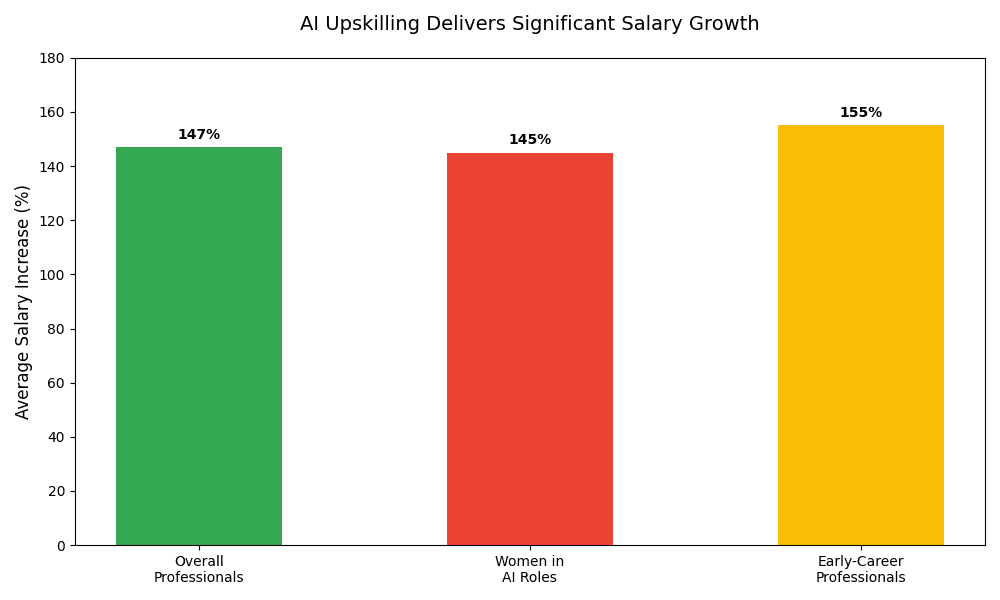
The answer isn't prompt engineering alone.
It is developing a combination of technical literacy, workflow design capabilities, critical thinking, operational judgment, and—perhaps most importantly—the human skills that machines cannot replicate: empathy, persuasion, strategic communication, and ethical decision-making.
As AI commoditizes technical execution, these interpersonal capabilities become your greatest differentiator.
Before creating a personal learning plan, it helps to understand the broader transformation already underway.
For a deeper analysis of these workforce shifts, read our companion guide:
Future of Work 2026: What AI Is Changing, What It Isn't, and How to Prepare
This roadmap builds on those trends and translates them into practical actions you can take over the next six months.
Months 1–2: Advanced Context Engineering and AI Base Literacy
Most people begin their AI journey by asking chatbots random questions.
While this creates familiarity, it rarely develops a meaningful professional advantage.
The first phase of your learning journey focuses on understanding how modern AI systems process information and how to provide the context necessary for high-quality outputs.
Think of this phase as learning how to communicate with intelligent systems at a professional level.
The Shift from Prompting to Context Architecture
One of the biggest misconceptions about AI is that better results come from clever prompts.
In reality, better results often come from better context.
Modern AI systems perform significantly better when supplied with:
Clear objectives
Company documentation
Standard operating procedures
Brand guidelines
Historical examples
Structured reference materials
Rather than spending hours crafting perfect prompts, successful professionals learn how to organize information so AI can interpret and use it effectively.
This skill is known as context engineering.
Imagine two marketing managers asking AI to write a campaign.
Manager A provides a single sentence.
Manager B provides:
Brand guidelines
Previous campaigns
Target audience profiles
Product documentation
Performance benchmarks
The second manager consistently receives more accurate and useful outputs.
The difference is not intelligence.
It is context.

Learning Information Architecture
The next step is understanding how information should be structured for AI systems.
Focus on organizing:
Internal Knowledge
Policies
Procedures
Training materials
Product information
Customer Knowledge
Frequently asked questions
Common objections
Support documentation
Customer personas
Personal Knowledge
Templates
Writing frameworks
Meeting structures
Research methodologies
Learning how to categorize and structure knowledge creates a foundation for future automation projects.
Advanced Modality Handling
AI is no longer limited to text.
Modern systems can process:
Images
PDFs
Audio recordings
Video transcripts
Data files
Code repositories
Presentations
Professionals who understand how to work across multiple formats gain a significant advantage.
Instead of asking AI to summarize a meeting, you can upload the transcript, supporting documents, customer feedback, and project requirements simultaneously.
This enables richer analysis and more practical recommendations.
During Months 1–2, deliberately experiment with different content formats.
The goal is to understand how AI interprets and combines information from multiple sources.
Build Your First Custom Assistant
One of the most valuable exercises during this phase is creating a specialized assistant tailored to your work.
Rather than using a generic chatbot, build a system that understands your:
Industry terminology
Communication style
Operating procedures
Templates
Strategic priorities
For example:
A consultant might upload proposal templates and client frameworks.
A founder might upload product documentation and customer profiles.
A marketer might upload campaign examples and brand guidelines.
Over time, this assistant becomes increasingly aligned with your workflow and can generate outputs that require far less editing.
Understanding the Cost of AI
A critical yet often overlooked aspect of working with AI is cost management.
API usage isn't free, and costs can escalate quickly if systems aren't designed efficiently.
Key factors to understand:
Token Economics
Every interaction with a large language model consumes tokens (pieces of text). Longer inputs and outputs cost more. Learning to be concise without sacrificing quality is a valuable skill.
Optimization Strategies
Use smaller models for simple tasks
Cache common responses
Structure prompts to minimize unnecessary processing
Monitor usage regularly
Budgeting for Workflows
When designing automated processes, estimate costs per interaction. For high-volume workflows, even small inefficiencies can become expensive.
This awareness separates cost-conscious professionals from those who build impressive but unsustainable systems.
Week-by-Week Action Plan: Months 1–2
Week 1: Foundation Building
Task: Create a personal knowledge folder and upload 10 relevant documents into a custom GPT or Claude Project.
Documents to include:
Company policies or standard operating procedures
Brand guidelines or style guides
Common templates you use regularly
Customer personas or audience profiles
Product or service documentation
Deliverable: A functional custom assistant that understands your work context.
Week 2: Prompt Template Library
Task: Build a library of 10–15 prompt templates for your most frequent tasks.
Examples:
Client email drafting
Meeting summary generation
Research briefing creation
Report outlining
Content repurposing
Tip: Structure each template with clear sections for context, objective, format, and constraints.
Deliverable: A reusable prompt library that saves time on recurring tasks.
Week 3: Multi-Modal Experimentation
Task: Upload and process at least 5 different content formats.
Try:
PDF reports → ask for key findings
Meeting transcripts → request action items
Images or screenshots → ask for analysis
Audio recordings → request summaries
Spreadsheets → ask for insights and patterns
Deliverable: Confident handling of diverse content types.
Week 4: Workflow Documentation
Task: Document 5 recurring workflows in your current job.
For each workflow, capture:
What triggers the process?
What inputs are required?
What manual steps happen?
What is the desired outcome?
Deliverable: A documented list of automation opportunities.
Week 5: Assistant Refinement
Task: Use your custom assistant for 10 real tasks this week.
After each task:
Review the output critically
Identify what worked and what didn't
Adjust your context, instructions, or reference materials
Document improvements
Deliverable: A refined assistant that produces consistently better outputs.
Week 6: Cost Awareness Practice
Task: Track your API usage and estimate costs.
Monitor:
Number of requests per week
Average tokens per request
Monthly estimated cost
Cost per completed task
Deliverable: A practical understanding of AI economics and optimization strategies.
Success Milestone
By the end of Month 2, you should have:
✓ A structured knowledge base
✓ A custom AI assistant tailored to your work
✓ Experience working with multiple content formats
✓ A practical understanding of context engineering
✓ A repeatable workflow for using AI in your daily tasks
✓ Awareness of API costs and optimization principles
✓ A documented list of 5 automation opportunities
Most importantly, you should begin viewing AI not as a chatbot but as a collaborative system that can ingest, parse, and utilize structured information.
Months 3–4: Workflow Automation and Multi-Agent Orchestration
By the beginning of Month 3, you should already understand how to work effectively with AI systems and provide them with structured context.
The next phase is where many professionals begin seeing measurable returns on their learning investment.
Instead of using AI to complete individual tasks, you will learn how to connect systems, automate repetitive workflows, and orchestrate multiple tools into a unified process.
This shift is significant.
The professionals creating the most value in 2026 are not necessarily those generating the best AI outputs. They are the people designing systems that generate those outputs automatically.
In other words, they have moved from being operators to becoming architects.
The Shift from Individual Tasks to Connected Systems
Most organizations still rely heavily on manual processes.
A lead enters through a website form.
Someone reviews it.
Someone else copies information into a CRM.
Another team member drafts a response.
A manager updates a spreadsheet.
Each step may only take a few minutes, but multiplied across hundreds or thousands of interactions, these repetitive activities consume substantial time.
AI and automation platforms allow these activities to be connected into a single workflow.
For example:
A lead submits a contact form.
The information is validated automatically.
AI categorizes the lead.
A personalized response draft is generated.
The CRM is updated.
The sales team receives a notification.
The lead is assigned to the appropriate pipeline stage.
The process happens within seconds instead of requiring multiple manual actions.
Your goal during Months 3–4 is to learn how these systems work and how to design them responsibly.
Mapping Information Flows
Before building automation, learn to visualize how information moves through your business or workplace.
This exercise often reveals inefficiencies that have existed for years.
Choose one recurring process and document:
The Trigger
What starts the process?
Examples:
Customer inquiry
New lead
Support ticket
Invoice request
Content approval request
The Inputs
What information enters the workflow?
Examples:
Form submissions
Emails
Documents
Customer records
Spreadsheet data
The Actions
What manual tasks occur after the trigger?
Examples:
Data entry
Categorization
Reporting
Drafting responses
Internal notifications
The Outcome
What should happen when the process is completed?
By mapping information flows visually, you begin thinking like a systems designer rather than a task executor.
This mindset becomes increasingly valuable as AI adoption accelerates.
Connecting the Ecosystem
Most businesses already possess the tools needed for automation.
The challenge is that these tools rarely communicate effectively without configuration.
Typical business ecosystems include:
Email platforms
CRM systems
Project management software
Knowledge bases
Accounting platforms
Customer support systems
Marketing tools
Your objective is to understand how information can move between these systems automatically.
For example:
A customer completes a website form.
The data is routed into a CRM.
AI analyzes the inquiry.
A project management task is created.
An onboarding email is drafted.
A notification is sent to the responsible team member.
No manual copying and pasting is required.
When implemented correctly, automation reduces operational friction while improving consistency.
Understanding Multi-Agent Systems
A growing trend in AI implementation involves using multiple specialized agents rather than a single general-purpose assistant.
Think of it as assembling a team.
Instead of one employee handling every responsibility, different specialists perform different functions.
For example:
Research Agent
Responsible for gathering and summarizing information.
Content Agent
Responsible for drafting reports, emails, and documentation.
Review Agent
Responsible for identifying inconsistencies, missing information, or factual concerns.
Operations Agent
Responsible for updating records and executing workflow actions.
Each agent has a clearly defined responsibility.
This specialization often produces better outcomes than relying on a single system to perform every task.
Understanding this concept prepares you for the next generation of AI-powered workplace tools.
Designing AI Agent Guardrails
Automation without governance creates risk.
As organizations increase AI adoption, they must establish clear operational boundaries.
These boundaries are often referred to as guardrails.
Guardrails define:
What information an AI system can access
Which actions it can perform
When human approval is required
What data should remain restricted
How errors are handled
For example:
An AI assistant may be permitted to draft client communications.
It should not be permitted to approve legal contracts automatically.
Similarly, an automation system may categorize customer inquiries but should not gain unrestricted access to confidential financial records.
Learning to configure guardrails is one of the most important skills of the AI era because it combines technical knowledge with business judgment.
Organizations increasingly need professionals who understand both.
Bias Awareness in Automation
AI systems are trained on data that reflects historical patterns, including biases.
These biases can manifest in harmful ways if left unchecked.
Common types of bias include:
Data Bias
The training data may overrepresent certain groups or perspectives, leading to skewed outputs.
Algorithmic Bias
The model's architecture or optimization function may favor certain patterns over others.
Prompt Bias
Users may inadvertently design prompts that reinforce their own assumptions.
Mitigation Strategies
Test outputs across diverse scenarios
Use multiple models to cross-check results
Maintain human oversight for high-stakes decisions
Document and review AI decisions regularly
Professionals who understand bias are better equipped to build fair, effective, and trustworthy AI systems.
Week-by-Week Action Plan: Months 3–4
Week 7: Automation Platform Fundamentals
Task: Complete the introductory courses for your chosen automation platform.
Recommended:
Zapier University (free)
Make Academy (free)
n8n documentation (open source)
Deliverable: A foundational understanding of how automation platforms work.
Week 8: Process Mapping
Task: Map the information flow for one key business process.
For your chosen process:
Draw the current flow visually
Identify every manual step
Count how much time each step takes
Note where data is copied or re-entered
Deliverable: A visual process map with automation opportunities highlighted.
Week 9: Build Your First Automation
Task: Create a simple workflow connecting at least two applications.
Beginner example:
New form submission → Send email notification
New calendar event → Create task in project management tool
Incoming email → Add to spreadsheet
Deliverable: A working automation that saves at least 30 minutes per week.
Week 10: Add AI Decision Points
Task: Add an AI step to your workflow that categorizes, summarizes, or generates content.
Examples:
AI analyzes inquiry type → Routes to appropriate team member
AI summarizes customer feedback → Adds to knowledge base
AI generates response draft → Sends for human review
Deliverable: A workflow with AI-assisted decision-making.
Week 11: Multi-Step Automation
Task: Build a workflow with at least 5 connected steps.
Example:
Lead form submitted
Information validated
AI categorizes lead
CRM record created
Email sequence started
Project management task created
Team member notified
Deliverable: A complete end-to-end automation.
Week 12: Guardrail Implementation
Task: Add at least one guardrail to your workflow.
Examples:
Require human approval for AI-generated responses
Restrict access to sensitive data
Implement error handling
Add validation checks
Deliverable: A governed automation system with clear boundaries.
Success Milestone
By the end of Month 4, you should be able to:
✓ Map information flows across a business process
✓ Design automation opportunities independently
✓ Connect multiple platforms into a working workflow
✓ Configure AI-assisted decision points
✓ Implement basic governance and guardrails
✓ Recognize potential bias issues in automated systems
✓ Measure operational efficiency improvements
Most importantly, you should begin seeing AI as part of a larger system rather than an isolated tool.
This perspective separates casual AI users from professionals who can drive meaningful business transformation.
Months 5–6: The Human Editorial Layer and Strategic Integration
After four months of learning, experimentation, and workflow design, you will have reached a point where many people stop.
They become proficient AI users.
But proficiency alone is no longer enough.
As AI capabilities continue to improve, the greatest professional advantage increasingly comes from the skills that machines struggle to replicate: judgment, strategic thinking, context awareness, accountability, empathy, persuasion, and decision-making under uncertainty.
The final phase of this roadmap focuses on developing these capabilities.
Your role is no longer to produce every piece of work manually.
Your role is to ensure that AI-generated work aligns with business objectives, quality standards, ethical requirements, and long-term strategy.
In many ways, you are transitioning from operator to editor-in-chief.

The 20% Elite Refinement Rule
A common misconception about AI is that it eliminates the need for human involvement.
In reality, the highest-performing professionals often spend less time creating and more time refining.
Many successful AI-assisted workflows follow a pattern:
AI generates the first 80%
Humans optimize the final 20%
That final 20% frequently determines whether an output succeeds or fails.
AI can generate:
Articles
Reports
Presentations
Emails
Research summaries
Marketing campaigns
However, it may still struggle with:
Strategic nuance
Brand positioning
Market context
Stakeholder expectations
Risk assessment
Long-term business implications
Emotional intelligence
Political and organizational dynamics
The professional advantage comes from recognizing these gaps.
During Months 5–6, practice reviewing AI-generated work critically rather than accepting outputs at face value.
Ask:
Is the logic sound?
Are assumptions valid?
Is any important context missing?
Does this align with business goals?
Would I confidently attach my name to this work?
Does this demonstrate understanding of the audience?
These questions become increasingly important as organizations scale AI adoption.
Hallucination Detection and Quality Control
AI systems can produce convincing but inaccurate information.
This phenomenon is often called hallucination.
The challenge is not that errors occur.
The challenge is that errors may appear credible.
Develop a structured review process.
Verify Facts
Cross-check:
Statistics
Quotes
Dates
Research findings
Legal references
Review Logic
Ensure conclusions actually follow the evidence provided.
Assess Completeness
Identify missing viewpoints, assumptions, or operational considerations.
Evaluate Business Relevance
A technically correct answer may still be strategically ineffective.
Recognize Quality Degradation
AI performance can change over time. Regularly audit your workflows to ensure output quality remains consistent.
Strong professionals learn to identify these issues quickly.
This capability becomes a valuable organizational asset.
Strategic Risk and Ethics
As AI becomes integrated into business operations, professionals must also understand its risks.
Organizations increasingly need people who can balance innovation with responsibility.
Key areas include:
Data Privacy
Understand what information should and should not be shared with AI systems.
Examples include:
Customer records
Financial information
Confidential business data
Proprietary intellectual property
Transparency
Determine when AI involvement should be disclosed.
For example:
Client-facing deliverables
Research reports
Marketing content
Customer communications
Accountability
AI can assist decision-making.
It should not replace accountability.
Humans remain responsible for outcomes.
Regulatory Awareness
Different industries may face unique compliance requirements related to AI usage.
Understanding these constraints helps prevent costly mistakes.
The Rising Value of Human Skills
As AI capabilities expand, human-centric skills become paradoxically more valuable.
Technical execution is increasingly automated.
Human connection, however, remains irreplaceable.
The most valuable professionals in the AI-augmented workplace combine technical literacy with:
Empathy
Understanding what stakeholders truly need, beyond what they explicitly request.
Persuasion
Communicating ideas in ways that influence decisions and inspire action.
Strategic Communication
Adapting messages for different audiences and contexts.
Trust-Building
Establishing credibility and reliability over time.
Negotiation
Navigating complex trade-offs and reaching mutually beneficial outcomes.
Adaptability
Learning and evolving as circumstances change.
These skills allow you to do what AI cannot: build relationships, navigate ambiguity, and exercise judgment in novel situations.
Investing in these capabilities alongside technical learning creates a powerful combination that is difficult to replicate.
AI as a Strategic Business Layer
By Month 5, many learners realize that AI is not simply another productivity tool.
It is becoming a business infrastructure layer.
Much like cloud computing transformed software development, AI is transforming how organizations process information and execute work.
Forward-thinking professionals begin asking:
Which processes should be automated?
Which processes require human oversight?
Where does AI create competitive advantage?
Where does it introduce risk?
How should teams be structured around AI capabilities?
What skills will our organization need in 2–3 years?
These questions move beyond execution and into leadership.
Organizations increasingly reward individuals who can answer them.

Week-by-Week Action Plan: Months 5–6
Week 13: Quality Control Framework
Task: Develop a structured review checklist for AI-generated outputs.
Include:
Fact verification
Logic assessment
Completeness review
Business relevance
Tone and style
Audience appropriateness
Deliverable: A reusable quality control checklist.
Week 14: Hallucination Detection Practice
Task: Review 10 AI-generated outputs and identify any inaccuracies.
For each output:
Verify at least 5 claims against reliable sources
Note any inconsistencies or contradictions
Document missing context or assumptions
Suggest improvements
Deliverable: A practical understanding of common AI errors.
Week 15: Role-Specific Automation Project
Task: Build an end-to-end workflow tailored to your specific role.
Choose one:
Consultant/Service Provider:
Client onboarding automation
Proposal generation workflow
Project reporting system
Operations Manager:
Vendor compliance automation
Inventory tracking system
Approval workflow
Marketing Professional:
Content repurposing system
Campaign reporting dashboard
Social media publishing workflow
Deliverable: A complete, documented workflow for your role.
Week 16: Cost and Performance Audit
Task: Analyze your automated workflows.
Measure:
Time saved per week
Cost per transaction
Error rate
User satisfaction
ROI
Deliverable: A performance report with optimization opportunities.
Week 17: Strategic Review
Task: Map your entire department or business workflow.
Identify:
Where automation exists
Where automation could be added
Where human judgment is critical
Where AI introduces risk
Skills needed for the next 2 years
Deliverable: A strategic AI implementation plan.
Week 18: Final Project
Task: Complete a comprehensive AI Opportunity Audit.
For your role, department, or business:
List every recurring activity
Categorize: Automatable / Augmentable / Human-Critical
Estimate time allocation
Design improvements
Implement one change
Measure results
Document lessons learned
Deliverable: A complete audit report with measurable outcomes.
Success Milestone
By the end of Month 6, you should be able to:
✓ Evaluate AI-generated outputs critically
✓ Detect common quality and accuracy issues
✓ Understand governance and risk management principles
✓ Identify automation opportunities independently
✓ Design AI-assisted operational improvements
✓ Lead conversations about AI adoption within a team or business
✓ Balance technical capabilities with human skills
✓ Recognize when human judgment is irreplaceable
✓ Build sustainable, cost-aware systems
Most importantly, you should understand how to combine human judgment with machine capabilities to achieve outcomes neither could produce alone.
Recommended Learning Resources by Month
Month | Focus Area | Recommended Resources |
|---|---|---|
Month 1 | AI Fundamentals & Context | DeepLearning.AI Short Courses, OpenAI Quickstart Guide |
Month 2 | Custom Assistants & Multi-Modal | OpenAI Custom GPTs, Anthropic Projects, OpenAI API Docs |
Month 3 | Automation Platforms | Zapier University, Make Academy, n8n Tutorials |
Month 4 | Workflow Design & Agents | Anthropic Documentation (Agents), Zapier Advanced, Make Advanced |
Month 5 | AI Strategy & Quality | Coursera AI Programs, Wharton AI Business, DeepLearning.AI Production |
Month 6 | Governance & Leadership | Industry Frameworks, Professional Communities, Internal Business Data |
Platform Cost Considerations
Platform | Free Tier | Paid Starting At |
|---|---|---|
ChatGPT | Yes (GPT-3.5) | $20/month (GPT-4) |
Claude | Yes (limited) | $20/month (Claude Pro) |
OpenAI API | No (pay-as-you-go) | Varies by usage |
Zapier | 100 tasks/month | $20/month |
Make | 1,000 operations/month | $10/month |
n8n | Self-hosted (free) | Cloud from $20/month |
Some courses free | $49/month (subscription) |
Budgeting Tip
Start with free tiers and trial accounts. Most professionals can complete the first 2–3 months of this roadmap without spending money. Upgrade only when you've validated the value of a specific tool.
The Real Goal Isn't Learning AI
Many people approach AI with a narrow objective:
"How do I use these tools?"
The more valuable question is:
"How do I increase my ability to solve problems, create value, and make decisions in an AI-augmented world?"
Technology will continue to evolve.
Specific tools will come and go.
New platforms will emerge.
Capabilities that seem advanced today may become standard tomorrow.
What remains valuable is your ability to understand systems, evaluate information, manage risk, align technology with real-world objectives, and connect with other humans in meaningful ways.
Those are the skills that compound over time.
The professionals and founders who thrive in the coming decade will not necessarily be the ones using the most AI.
They will be the ones who know where AI belongs, where it doesn't, and how to combine automation with human insight to create meaningful results.
The future of work is not human versus AI.
It is increasingly human plus AI.
The sooner you learn to operate in that reality, the greater your advantage becomes.
Frequently Asked Questions
Do I need a technical background to follow this roadmap?
No. The roadmap is designed for professionals, managers, entrepreneurs, consultants, and small business owners. Most activities rely on practical implementation rather than software engineering skills.
How many hours per week should I dedicate?
A commitment of 3–5 hours per week is sufficient for most learners. Consistency matters more than intensity.
Is prompt engineering still important?
Yes, but it is increasingly becoming a baseline skill. Context engineering, workflow design, and strategic oversight typically create more long-term value.
Which industries benefit most from AI upskilling?
Nearly every knowledge-based industry can benefit, including marketing, consulting, finance, education, operations, customer service, healthcare administration, and entrepreneurship.
Will AI replace my job?
AI is more likely to change how work is performed than eliminate entire professions overnight. Individuals who learn to collaborate effectively with AI systems are generally better positioned than those who ignore the shift. Roles requiring empathy, persuasion, trust-building, and complex negotiation remain difficult to automate.
What is the most important skill to learn first?
Understanding how to structure information and provide context to AI systems is often the highest-leverage starting point because it improves results across nearly every use case.
How do I manage AI costs effectively?
Start by monitoring usage closely, use smaller models for simple tasks, cache common responses, and establish budget alerts. Cost awareness should be part of every workflow design decision.
How do I ensure my AI systems are fair and unbiased?
Test outputs across diverse scenarios, use multiple models to cross-check results, maintain human oversight for high-stakes decisions, document AI decisions, and regularly review for unintended patterns.
What if I don't have access to premium AI tools?
Many platforms offer free tiers or trial periods. You can also use open-source models, explore community resources, and focus on learning principles that apply regardless of the specific tool.
How do I convince my organization to invest in AI adoption?
Start with a small, measurable pilot project. Document time saved, quality improvements, or cost reductions. Use concrete data to build the business case for broader implementation.
How long until I see measurable results?
Many professionals report measurable time savings within the first 4–6 weeks. Full workflow automation projects typically deliver ROI within 2–3 months.
What if I fall behind the recommended pace?
The roadmap is designed to be flexible. If you need more time for a particular phase, take it. The goal is sustainable learning, not speed.
Final Thoughts from the Distrya Team
At Distrya, we've observed that the most successful AI implementations rarely begin with advanced technology. They begin with a clear understanding of workflows, objectives, and human responsibilities.
This six-month roadmap reflects practical lessons drawn from real-world digital transformation projects, business automation initiatives, and operational consulting experiences.
The goal isn't to become an AI expert overnight.
The goal is to become the kind of professional who can confidently navigate a future where intelligent systems are part of everyday work.
Start small. Stay consistent. Focus on implementation over theory.
Six months from now, you'll likely be surprised by how much of your work has changed—and how much more valuable your time has become.
Ready to begin your journey? Start with Week 1: organize your knowledge base. The rest will follow.