
Monday morning.
Ten employees.
Hundreds of repetitive tasks.
Customer replies delayed by 18 hours.
Invoices manually tracked in three different spreadsheets.
Leads scattered across email, Slack, and Post-it notes.
The founder’s phone buzzed with “urgent” before sunrise.
Burnout was rising faster than revenue.
Eight months later, this exact company managed to reduce business overhead by 40% — without a single layoff. The breakthrough didn’t come from increasing headcount or forcing longer hours. Instead, it required a structured, unsexy, and relentlessly practical approach to business process automation.
If you are looking for real-world workflow automation examples that actually move the needle, this is the exact roadmap they followed. We break down every number, every misstep, and the exact software stack used to unlock sustainable growth.
Quick Snapshot: The Business Before and After AI Automation
Metric | Before AI Automation | After AI Automation |
|---|---|---|
Team size | 10 people | 10 people |
Industry | Digital services & client operations | Digital services & client operations |
Biggest bottlenecks | Customer response, reporting, lead sorting, scheduling | None remaining unaddressed |
AI tools implemented | AI chatbot, automated CRM workflows, AI meeting summaries, reporting automations | |
Hours saved per week | — | 120+ hours |
Operational cost reduction | — | 40% reduction in overhead |
Revenue impact | Stagnating despite demand | 15% increase in billable capacity (same team) |
Implementation timeline | — | 8 weeks to first measurable ROI, continuous optimization over 8 months |
The Breaking Point: When Scaling Operations Creates Chaos
The business wasn’t failing. It was suffocating under its own weight. New clients were coming in, but every new contract added invisible complexity. The team of ten felt like three. The founder, Elena, spent her Fridays manually compiling reports that no one read. The operations lead, Marcus, cleared his inbox twice a day and still had 70 unanswered customer emails by 6 p.m.
“We were profitable on paper,” Elena said, “but our operational cost per client was eating us alive.”
The Pain Points of Manual Operations
Customer response time: average 14 hours (best-case), often 24+ hours for non-urgent queries.
Weekly reporting: 8 hours of manual data pulling, screenshotting dashboards, formatting PowerPoints.
Lead management: 50+ inbound leads per month, manually sorted by “gut feeling,” 20% never followed up.
Meeting admin: No summaries, no action items captured — decisions repeated in three consecutive calls.
Invoicing: Two different systems, manual cross-checking, an average of 3 billing errors per month.
Total wasted hours: 120–140 hours per week — the equivalent of three full-time employees doing work that added no strategic value. The team wasn’t lazy. The systems were invisible cages.
The Scaling Trap: Hiring vs. Core Workflow Design
Small businesses often fall into a dangerous trap: scaling by adding people instead of scaling by designing better workflows. When Elena first considered AI, her board suggested hiring two more people. “We need more hands,” they said.
But adding two salaries would have increased overhead by roughly $120,000 per year — and done nothing to fix the root cause. The real problem was operational debt: the accumulated cost of manual processes, tribal knowledge, and disjointed tools that no one had ever questioned.
The Financial Dilemma: Adding Headcount vs. Implementing AI
Factor | Hiring 2 Employees | AI Workflow Automation |
|---|---|---|
Upfront cost | 10k–10k–15k (recruitment, onboarding) | 4k–4k–7k (initial setup, tools, consulting) |
Monthly cost | $10k+ (salaries, benefits, tools) | 600–600–1,200 (software + maintenance) |
Speed to impact | 3–4 months (ramp-up) | 4–8 weeks (first measurable results) |
Scalability | Linear | Compound (automations handle volume) |
Morale impact | Mixed (culture shift) | Positive (less repetitive work) |
The insight was simple: the team didn’t need more people; it needed fewer repetitive tasks. The bottleneck wasn’t headcount — it was a workflow design that forced humans to act like machines.
Before diving into automation, Elena’s team conducted an AI workflow audit to pinpoint exactly which processes were consuming disproportionate time with minimal human judgment required.
Step-by-Step AI Audit: Identifying High-Repetition Business Tasks
The audit wasn’t a vague brainstorming session. It was a brutal, stopwatch-level examination of every task across three core areas.
Customer Support: The Silent Margin Killer
The team handled 300+ customer queries per week. 65% were repetitive:
“Where is my order/update?”
“How do I reset my password?”
“What are your working hours?”
“Can I reschedule?”
These required zero creativity but consumed 22 hours of team time every single week.
Audit finding: 7 out of 10 support tickets could be resolved without human intervention.
Sales Operations: Revenue Leakage Through Cracks
Leads arrived through web forms, LinkedIn, email, and referrals. A spreadsheet named “Leads_Master_FINAL_v3.xlsx” was the system. Qualification was subjective. Follow-ups were inconsistent. The sales pipeline had a 19% leakage rate simply because leads were forgotten.
Audit finding: Structured lead qualification and automated follow-up could recover 8,000–8,000–12,000 in monthly pipeline value.
Internal Operations: The Admin Tax
Every internal task had a hidden “switching cost.” Weekly reporting alone cost 32 hours per month. Documentation lived in five different Google Drive folders. Meeting outcomes were scattered across notebooks and Slack threads. Internal knowledge was trapped in DMs.
Audit finding: Automation could cut internal ops overhead by 50% with minimal behavioral change.
The Small Business AI Stack: Tools That Powered the Transformation
Elena’s team didn’t go for a shiny AI suite that promised to “reinvent work.” They chose boring, reliable, production-grade tools that integrated with what they already used. This is where you see the real value of AI tools for small business — not in exotic custom solutions, but in connecting the software you already know.
Function | Old Process | AI Automation Implemented | Result |
|---|---|---|---|
Customer support | Manual replies, copy-paste templates | AI chatbot via Intercom + workflow automation in Make | Response time dropped from 14h to under 5 minutes for common queries |
Reporting | Manual data export, spreadsheet assembly | AI-generated summaries pulled from live dashboards via Notion AI | Weekly reporting went from 8 hours to 20 minutes |
Lead management | Manual sorting, sporadic follow-up | AI lead qualification in HubSpot + automated drip sequences | Lead follow-up rate increased to 98%, conversion improved by 22% |
Scheduling | Endless email back-and-forth | Calendly routing + AI scheduling assistant | Average scheduling time per meeting dropped from 17 minutes to 2 minutes |
Internal documentation | Scattered notes, tribal knowledge | AI knowledge base using Notion AI that ingested all Slack, docs, and meeting transcripts | New hire ramp-up time reduced by 40% |
The guiding principle was clear: automate tasks, not roles.
Beyond the Hype: Building Production-Grade AI Systems
There’s a growing movement of quickly spinning up fragile AI prototypes with no regard for reliability, documentation, or scalability. It’s wonderful for exploration. It’s dangerous for operations.
Marcus, the ops lead, put it bluntly: “If the automation breaks while I’m asleep, my phone rings. I’m not interested in something that works 80% of the time.”
The Production-Ready Checklist for Operations
Error handling: Every AI automation had a fallback — if the chatbot couldn’t resolve a query in two turns, it routed to a human with full context.
Logging and audit trails: All AI-generated actions (emails sent, data updated) were logged in a central system.
Human-in-the-loop for critical decisions: AI could draft a client proposal, but a human approved it before sending.
Documentation: Every workflow was mapped in Notion, not just in someone’s head.
This maturity separates simple AI experiments from scalable AI operations. The team deliberately focused on scaling AI prototypes into real business tools, building systems that could scale with the business, not collapse under pressure.
Step 2: Automating Customer Communication — Emotional Relief, Measurable Impact
The first automation that went live was customer support. Not because it was easiest, but because the pain was loudest.
They implemented an AI-powered support layer that:
Answered FAQs instantly by pulling from a knowledge base.
Recognized order numbers and tracking inquiries and provided real-time updates.
Escalated complex queries to the right team member with a full summary.
Drafted personalized follow-up emails after ticket resolution to collect feedback.
The Numbers That Changed Everything
First response time: 14 hours → under 2 minutes for automated tickets.
Ticket deflection rate: 62% of incoming queries resolved without human touch.
Customer satisfaction (CSAT): Improved by 11 points, because speed matters more than we admit.
Team stress: Marcus stopped waking up at 5 a.m. to clear the overnight queue.
“It felt like we hired a calm, competent assistant who never slept and never complained,” said Lena, the lead customer success manager. “I could finally focus on clients who actually needed empathy and strategic help.”
Step 3: Rebuilding Internal Operations Around AI (Not Replacing People)
The next frontier was internal operations — the silent, invisible work that keeps a business running. The goal was never to remove humans from the loop but to remove the loop from humans.
What They Automated Internally
SOP generation: AI ingested recorded screen flows and turned them into step-by-step documentation, complete with screenshots and decision trees.
Internal knowledge system: A custom AI assistant connected to Slack, Notion, and Google Drive. Team members could ask “What’s the process for handling a refund?” and get an instant, sourced answer.
Meeting intelligence: Every client and internal meeting was transcribed, summarized, and action items were automatically assigned in the project management tool.
Reporting automation: Instead of manually pulling numbers, a weekly AI report landed in Slack every Monday at 8 a.m. with commentary on trends, anomalies, and recommended actions.
The cultural shift was profound. Team members stopped hoarding information and started trusting the system. “I don’t have to be the bottleneck for answers anymore,” Marcus noted. “The AI doesn’t judge you for asking the same question twice.”
Operational overhead in internal tasks dropped by 45% within 3 months. But the real win was intangible: the team started doing work that felt human again.
The Financial Impact: Where the 40% Reduction Actually Came From
A 40% overhead reduction on a 60,000monthlyoperatingcostmeant ∗∗60,000monthlyoperatingcostmeant ∗∗24,000 less spent per month** on operations — without cutting salaries or increasing prices. Let’s break down exactly how the savings materialized.
Cost Reduction Breakdown
Area of Savings | Old Cost / Waste | New Automated Outcome | Monthly Financial Impact |
|---|---|---|---|
Labor Efficiency | 320 billable hours/week | 370 billable hours/week | +$7,200 revenue capacity |
Client Retention | 1–2 leaked clients/quarter | 96% retention rate | +$8,000 preserved MRR |
Invoicing Errors | 4.2% error rate ($1,200 loss) | 0.3% error rate | +$1,200 saved |
Tool Consolidation | 14 disjointed SaaS tools | 9 deeply integrated tools | +$900 saved |

Deeper Dive into the Savings
Labor efficiency: Same team handled 15% more clients. Billable hours increased from 320/week to 370/week, translating to $7,200 monthly revenue uplift without extra headcount.
Reduced operational delays: Delayed responses used to cause 1–2 client losses per quarter. Now, with automated responses and smarter routing, client churn dropped, preserving roughly $8,000/month in recurring revenue.
Fewer errors: Manual data entry and invoicing mistakes cost $1,200/month in corrections. Near-complete elimination brought error rate from 4.2% to 0.3%.
Reduced tool sprawl: Consolidating from 14 tools to 9 eliminated $900/month in redundant subscriptions. The AI layer became the glue.
Overhead costs (non-billable hours, tool waste, error correction) fell from 55% of operating budget to 33%.
ROI Timeline: When the Investment Started Paying Back
AI automation is often framed as a long-term bet. For this business, the payback was measured in weeks.
Timeline | Activity | Cost | Impact |
|---|---|---|---|
Month 0 | AI workflow audit + tool selection | $2,500 (consulting) | Baseline established |
Month 1 | Customer support automation setup | $3,000 (implementation + software) | 20 hours saved in first week |
Month 2 | Internal ops & reporting automation | $2,000 | 40+ hours/week saved; team capacity increase visible |
Month 3 | Lead management & scheduling | $1,500 | Conversion uplift, reduced scheduling friction |
Month 4 | Full integration, refinement | $800/month (ongoing) | Monthly savings reached $24,000; net positive ROI |
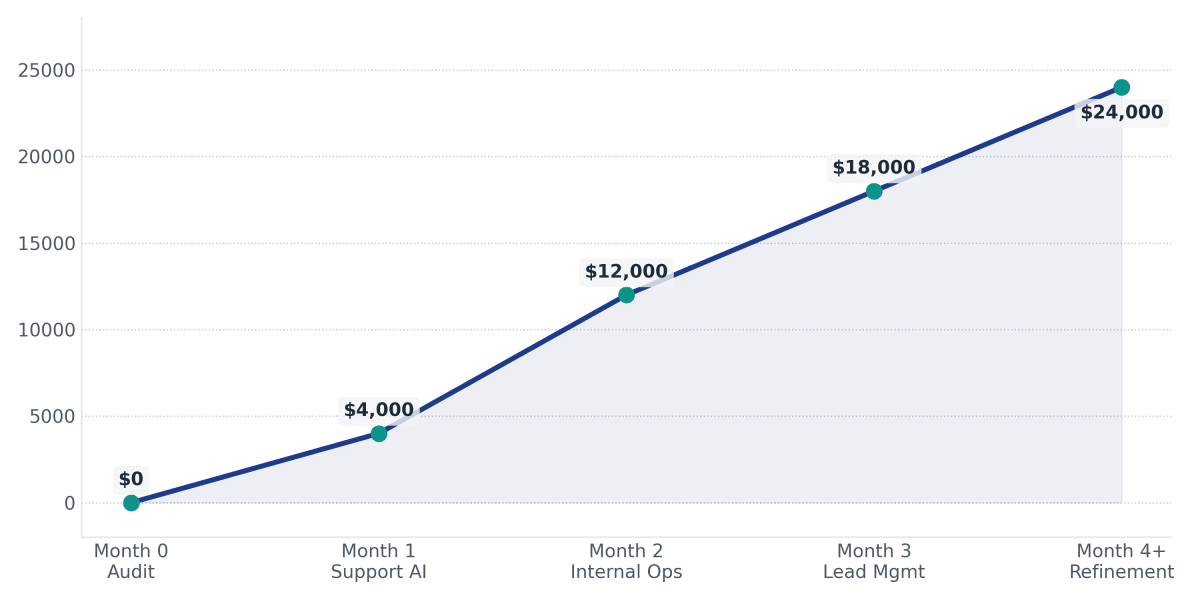
Break-even point: 2.3 months. From that point on, every dollar of overhead saved compounded. The business wasn’t just leaner — it was structurally more profitable.
To model this for your own business, use the AI ROI calculator to estimate savings based on your team size and current workflow pain points.
The Human Side of Automation Nobody Talks About
The business case for AI automation is often framed in spreadsheets and efficiency ratios. But inside the team, something deeper changed.
A support agent who used to spend her day copying and pasting suddenly had time to create a client education video series that reduced future tickets.
A junior operations coordinator who dreaded Monday reports started presenting strategic insights instead of assembling data.
The founder, Elena, stopped working 60-hour weeks and took her first real vacation in three years — without a single “urgent” call.
Repetitive, low-agency work is a slow-burning fire. It doesn’t just waste time; it erodes meaning. The team’s engagement scores improved sharply. “I feel like I’m using my brain again,” one team member said.
This is the paradox of AI automation done right: it doesn’t dehumanize work; it removes the parts that already were dehumanizing.
What Small Businesses Get Wrong About AI Automation
Before and during the implementation, Elena encountered almost every misconception in the book.
“AI replaces employees.”
Reality: AI replaced repetitive tasks, not roles. Headcount stayed the same; output increased. Team members were reskilled into higher-value work.
“Automation is expensive.”
Reality: The total initial investment was under 9,000,withongoingcostsunder9,000,withongoingcostsunder1,000/month. The alternative — hiring two additional people — would have cost $120,000/year. Automation was a fraction of the cost.
“Small businesses are too small for AI.”
Reality: Small teams have the most to gain. When a 10-person team loses 120 hours/week to manual work, there’s no buffer. AI isn’t a luxury for enterprises; it’s a survival lever for lean operations.
“You need developers for everything.”
Reality: No-code and low-code AI tools have matured. The team used off-the-shelf platforms, with only one integration requiring a freelance developer for 15 hours of work. The core systems were configured by the operations lead after a structured audit.
The 5 Automations That Created the Biggest Impact
Not all automations are equal. Based on actual data from this case, these five delivered over 80% of the total overhead reduction.
1. Lead Qualification
AI scored and routed inbound leads based on fit, intent, and behavior. Follow-up sequences triggered automatically. Pipeline leakage dropped to near zero.
2. Customer Support Automation
AI chatbot and workflow resolved 62% of tickets without human intervention, slashing response times and freeing 22 hours per week.
3. Internal Documentation & Knowledge Retrieval
A searchable AI knowledge base eliminated the constant “where is that file?” and “what’s the process?” interruptions.
4. Reporting Automation
AI-generated weekly reports with natural language insights transformed a 32-hour/month burden into a 2-hour review process.
5. Scheduling & Follow-Ups
AI scheduling assistant eliminated email ping-pong. Automated post-meeting follow-ups ensured no action item was lost.
Lessons Learned After 8 Months of AI Adoption
Elena’s team didn’t get everything right on day one. Here’s what they’d tell another small business staring at the same chaos.
Start small, but start now. They didn’t automate everything at once. The support system went live first, funded by the time it immediately saved.
Automate bottlenecks, not everything. Some tasks should remain manual. Artful client strategy, creative brainstorming, and complex conflict resolution stayed human.
Measure outcomes weekly, not monthly. Agility came from short feedback loops. If an automation wasn’t working, they tweaked it within days.
Process clarity before AI. Automation magnifies process flaws. If your workflow is broken, AI accelerates the breakage. The audit phase was non-negotiable.
Culture eats algorithms. Team buy-in was critical. People needed to trust the AI wouldn’t undermine them. Transparency made all the difference.

A Blueprint Other Small Teams Can Follow
Based on this case study, here’s a replicable framework for any small business.
Phase 1: Workflow Audit
Map every recurring task. Tag each as “high repetition, low human judgment” or “requires human nuance.” The former is your automation target.
Phase 2: Identify Repetitive Tasks
Quantify time wasted, error rates, and emotional cost. Prioritize tasks that cause the most pain and consume the most hours.
Phase 3: Introduce AI Assistants
Start with one high-impact area (usually customer support). Choose tools that integrate with your existing stack and have strong fallback mechanisms.
Phase 4: Automate Communication
Layer in email drafting, lead responses, and internal knowledge retrieval. Keep a human approval loop for sensitive outputs.
Phase 5: Measure ROI Religiously
Track time saved, cost reduced, errors eliminated, and revenue impact. Tie automation to business outcomes, not just “cool tech.”
Phase 6: Scale Gradually
Move to internal operations, reporting, scheduling, and deeper CRM automation. Document every new workflow. Build a library, not a black box.
Best AI Tools for Small Teams in 2026
The tool landscape evolves fast, but the principles remain constant. For a curated selection that matches lean teams, explore the AI tools for solopreneurs guide — the same tools scale beautifully for small businesses.
Communication & Support: AI-native helpdesks like Intercom, Zendesk AI, or Tidio.
Workflow Automation: No-code hubs such as Make, Zapier, or n8n.
Documentation & Knowledge: Notion AI, Slite, or Guru.
CRM & Lead Management: HubSpot, Pipedrive with AI add-ons, or Close.
Scheduling & Coordination: Calendly, Motion, or Reclaim.ai.
Analytics & Reporting: Notion AI, Google Sheets with GPT add-ons, or Databox.
The key is integration, not isolation. A stack that talks to itself reduces manual reconciliation and keeps data clean.
Final Takeaway
Eight months earlier, Monday morning meant chaos. Now it means clarity.
The same ten people are still there. But they’ve been given back 120+ hours a week of their lives. The business runs on calm systems instead of heroic individual effort. Overhead has structurally decreased, profitability has climbed, and the team is building rather than coping.
The businesses winning with AI are not the ones replacing people fastest.
They’re the ones removing friction fastest.
AI didn’t save this business. Clarity of process, applied with the right tools, saved it. The AI was the lever, not the destination.
What would a 40% overhead reduction look like for your business?
Calculate Your AI ROI →
Want to find the right tools to start?
Explore AI Tools for Small Teams →
Frequently Asked Questions
How much can AI automation realistically reduce operational costs?
In this case study, a 10-person business reduced operational overhead by 40% within eight months. Many small teams can expect 25%–45% overhead reduction when automation targets high-repetition tasks.
What business processes should be automated first?
Start with tasks that are high-volume, low-judgment, and time-consuming: customer support FAQs, lead qualification, scheduling, reporting, and internal documentation. An AI workflow audit helps pinpoint the highest-impact areas specific to your business.
Is AI automation expensive for small businesses?
No. The initial investment in this case was under 9,000,withongoingmonthlycostsbelow9,000,withongoingmonthlycostsbelow1,000. Most small businesses can begin with affordable no-code tools and scale as savings appear.
How long does AI implementation take before seeing results?
In this scenario, the first measurable time savings appeared within one week of implementing customer support automation. Full ROI was achieved in just over two months.
Can AI automation work without developers?
Yes. Most tools used in this case were no-code or low-code. Only one integration needed a short freelance developer involvement. Operations-minded team members can manage the majority of configuration.
What’s the typical ROI timeline for AI automation?
This business broke even in 2.3 months. From there, monthly savings compounded. Most well-structured implementations see positive ROI within 2–4 months, with accelerating returns as more workflows are automated.